
Download Pixiemint – AI‑Powered Text‑to‑Image Generator for Creatives
Overview
Pixiemint is a cutting‑edge, web‑based AI design tool that transforms textual descriptions into vivid, high‑resolution images. Built on the latest advances in natural language processing and computer vision, Pixiemint’s Text‑to‑Image engine interprets the nuance of your prompts—whether you need a sleek product mock‑up, an abstract illustration, a data‑driven visual aid, or a whimsical concept art piece—and renders them in seconds. The platform is purpose‑built for designers, marketers, researchers, educators, and anyone who needs to move quickly from concept to visual prototype without the steep learning curve of traditional graphic software.
Because it runs entirely in the browser, Pixiemint offers a secure, subscription‑based service that eliminates the need for bulky installations while still delivering professional‑grade output. Users benefit from encrypted cloud storage, automatic versioning, and a collaborative workspace that keeps teams in sync across continents. Whether you’re drafting a pitch deck, brainstorming a brand identity, simplifying complex research findings, or teaching a classroom about visual storytelling, Pixiemint bridges the gap between language and imagery, letting you focus on creativity rather than technical execution.
The service also complies with GDPR and CCPA, ensuring that personal data and generated assets remain private and under your control. In short, Pixiemint is a versatile, secure, and instantly accessible tool that redefines how visual content is created in the modern, remote‑first workplace.
Key Features & Benefits
- Advanced Text‑to‑Image Engine: Leverages deep‑learning models to generate images that faithfully reflect detailed prompts, supporting nuanced concepts such as lighting, mood, and perspective.
- Style Customization: Choose from a library of artistic styles—photorealistic, watercolor, line‑art, cyberpunk, vintage, and more—to match the tone of your project.
- Aspect Ratio Control: Adjust output dimensions (1:1, 16:9, 4:3, custom) to fit social media posts, presentations, or print formats without additional cropping.
- Real‑time Preview & Iteration: Instantly see a low‑resolution preview, tweak your prompt, and request a high‑resolution final render with a single click.
- Batch Generation: Upload a CSV of prompts and let Pixiemint produce multiple images in parallel—ideal for large‑scale marketing campaigns or academic datasets.
- Secure Cloud Storage: All generated assets are saved to an encrypted personal workspace, accessible from any device with an internet connection.
- API Access: Developers can integrate Pixiemint’s generation engine into internal tools, CMS platforms, or custom applications via a RESTful API.
- Collaboration Tools: Share links with teammates, leave comments directly on images, and manage version history to keep creative feedback organized.
Why Pixiemint Stands Out
While many AI image generators focus on novelty, Pixiemint emphasizes accuracy, reproducibility, and professional workflow integration. The platform’s prompt‑parsing algorithm has been trained on millions of paired text‑image datasets, ensuring that subtle descriptors—such as “soft morning light filtering through pine needles” or “retro-futuristic cityscape at dusk” —translate into precise visual cues. This reliability makes Pixiemint especially valuable for research teams that need consistent visual representations of experimental conditions, as well as advertising agencies that must meet strict brand guidelines on every iteration.
Moreover, Pixiemint’s subscription model includes unlimited revisions and priority rendering on its dedicated GPU cluster, guaranteeing fast turnaround even during peak usage. The tool also supports export in PNG, JPEG, and SVG formats, giving designers flexibility for downstream editing in Adobe Creative Cloud, Figma, or Sketch. For power users, the batch generation and API endpoints allow automation of thousands of images, reducing manual workload dramatically.
Finally, the collaborative workspace with comment threads and version control turns Pixiemint into a hub for creative teams, eliminating the need for separate project‑management software.
In practice, users report that Pixiemint cuts concept‑to‑visual time by up to 80 %, freeing resources for higher‑level design thinking and strategic planning. The combination of a robust feature set, secure cloud architecture, and an intuitive browser‑based interface positions Pixiemint as a leader in the AI‑driven graphics market, appealing to both seasoned professionals and emerging creators looking for a fast, reliable way to turn words into compelling visuals.
Installation, Usage & Compatibility
Because Pixiemint is a fully cloud‑based solution, there is no traditional “installation” process. Users simply visit pixiemint.com, create an account, and begin generating images directly from their browser. The onboarding wizard guides new users through a quick tutorial that covers prompt syntax, style selection, and export options, ensuring that even first‑time visitors can start creating within minutes.
Step‑by‑Step Guide
- Create an Account: Sign up with an email address or use Google/Apple single sign‑on. Choose a subscription tier (Free trial, Pro, or Enterprise) that matches your usage volume.
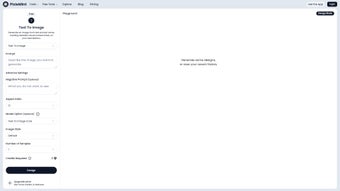
- Enter Your Prompt: In the “Text to Image” field, type a clear, descriptive sentence. For best results, include adjectives, objects, lighting conditions, and desired style. Pixiemint also supports “prompt chaining” where you can refine an existing image by adding new instructions.
- Select Style & Ratio: Pick an artistic style from the dropdown and set the aspect ratio that matches your final use case—whether it’s a square Instagram post, a widescreen banner, or a custom print size.
- Generate Preview: Click “Render Preview” to see a low‑resolution version. The preview loads in under two seconds on a standard broadband connection, allowing you to iterate quickly without consuming high‑resolution credits.
- Produce Final Image: Once satisfied, click “Generate High‑Res”. The image is processed on Pixiemint’s GPU servers and appears within seconds. You can monitor rendering progress via a progress bar and receive an email notification when the image is ready.
- Export & Share: Download the file in PNG, JPEG, or SVG, or copy a shareable link to collaborate with teammates. Export settings let you choose color profiles (sRGB, AdobeRGB) and DPI for print‑ready assets.
- Organize & Store: Use the built‑in folder system to categorize projects, add tags for easy searching, and set expiration dates for temporary assets if needed.
Supported Operating Systems
Pixiemint runs on any modern web browser, making it compatible with the following operating systems:
- Windows 10 and later (Edge, Chrome, Firefox, Opera)
- macOS 11 (Big Sur) and later (Safari, Chrome, Firefox)
- Linux distributions with recent Chromium‑based browsers (Ubuntu, Fedora, Debian)
- iOS 14+ (Safari, Chrome) and Android 9+ (Chrome, Firefox) via mobile browsers
Because all processing occurs in the cloud, performance is largely dependent on your internet connection rather than local hardware. For power users, a stable broadband connection (minimum 10 Mbps download and 5 Mbps upload) is recommended to ensure smooth preview loading and rapid high‑resolution rendering. Users on slower connections can still generate images, but the preview and final render may take longer. Pixiemint also supports progressive rendering, which streams low‑quality previews first and refines them as more data arrives, providing a responsive experience even on modest networks.
Pros, Cons & Frequently Asked Questions
Pros
- Highly accurate text‑to‑image conversion with nuanced style control.
- No software download required; works on any device with a modern browser.
- Fast GPU‑accelerated rendering, even for large batches or complex prompts.
- Secure, encrypted workspace for private projects and team collaboration.
- Comprehensive API access enables integration into existing design pipelines.
- Extensive library of export formats and color‑profile options for print and digital use.
- Built‑in version history and commenting keep creative feedback organized.
Cons
- Subscription cost may be prohibitive for occasional hobbyists or students on a tight budget.
- Dependent on internet connectivity; offline generation is not possible, which can be limiting in low‑bandwidth environments.
- Complex prompts sometimes need multiple iterations to achieve the exact vision, requiring a learning curve for optimal prompt engineering.
- High‑resolution renders consume credits; heavy users may need to purchase additional credit packs.
- Advanced features such as batch CSV upload are only available on Pro and Enterprise plans.
Frequently Asked Questions
How secure is my data on Pixiemint?
All images and prompts are stored in an encrypted cloud environment that complies with GDPR and CCPA standards. Only the account owner and invited collaborators can access the workspace, and data is retained for as long as you keep an active subscription.
Can I use Pixiemint for commercial projects?
Yes. The Pro and Enterprise plans include a commercial‑use license that permits unlimited distribution of generated images in marketing, advertising, product design, and other commercial contexts.
Is there a free trial available?
Pixiemint offers a 7‑day free trial with access to all core features and up to 50 high‑resolution renders. No credit card is required to start the trial, and you can cancel at any time before the trial ends.
How does Pixiemint handle copyright for generated images?
Generated images are owned by the user who created them. Pixiemint does not claim any rights, and you can freely use the assets in any medium, provided you comply with the platform’s terms of service and do not violate third‑party intellectual property.
Can I integrate Pixiemint with my existing design tools?
Through the RESTful API, you can automate image generation directly from tools like Figma, Adobe XD, Sketch, or custom CMS platforms. Detailed API documentation, SDKs for JavaScript and Python, and example workflows are available in the developer portal.
What file formats does Pixiemint support for export?
Pixiemint supports PNG, JPEG, and SVG exports. For print‑ready projects you can also choose TIFF with selectable DPI and color‑profile settings.
Conclusion & Call to Action
Pixiemint represents a significant leap forward for anyone who needs to translate ideas into visual form quickly and accurately. Its AI‑driven engine, flexible styling options, and seamless web‑based workflow eliminate many of the bottlenecks associated with traditional graphic design software. The platform’s secure cloud infrastructure, collaborative features, and robust API make it a compelling choice for freelancers, research labs, marketing departments, and large enterprises alike. While the subscription cost may be a consideration for occasional users, the productivity gains, consistency of output, and ability to scale image production across teams often outweigh the expense. Whether you’re a freelance illustrator preparing client mock‑ups, a research team visualizing data trends, or a marketing department launching a rapid ad campaign, Pixiemint provides a reliable, secure, and scalable solution.
Ready to experience the future of text‑to‑image creation? Start your free trial today and discover how effortless it can be to turn words into compelling visuals. Join the growing community of creators who have already streamlined their workflow with Pixiemint, and unlock a new level of creative freedom.
Overall Rating: 4.5 / 5
Pros: Accurate rendering, fast cloud processing, extensive style library, collaborative workspace, API integration.
Cons: Requires subscription for unlimited use, no offline mode, learning curve for complex prompt engineering.



.png)



